
The Best Task Management Tool For Founders In 2026
If you've ever spent an entire week "setting up a new system" for it not to stick, this one's for you.
Notion, Todoist, Asana, Trello. Maybe ClickUp and Monday.com are lurking in your browser tabs too. Each one of them promises to be the answer to your chaos. Each of them has the potential to become another thing you have to manage, instead of a thing that helps you.
I was chatting with a couple of founders at a networking event just the other week, who both shared that they struggled to get a digital solution to work for them.
The most common mistake I see founders make when they set up a project management tool is diving straight in before they've thought about what they actually need. They start creating projects, realise they've structured things in a way that doesn't quite work, abandon it, start again and end up with a graveyard of half-built projects across many different apps!
If you’ve decided to go digital, which tool should you use?
which task management tool should I use?
Todoist is best for solo founders who want simple personal task tracking.
Notion is best if you want an all-in-one workspace for docs, notes and tasks together (but it has a steep learning curve).
Trello is best for simple, visual projects.
Asana is best once you have a team and need visibility across shared projects and deadlines.
That said… the best system is always going to be the one you stick with.
I’ve tried all four, and Asana was the one that I managed to make work for me.
What's the Difference Between Notion, Todoist, Trello and Asana?
Notion is a flexible workspace, Todoist is a to-do list, Trello is a visual board for simple workflows and Asana is a structured tool built for teams managing shared projects.
They all technically "manage tasks," but they were built to solve different problems:
Todoist was built for individuals who want to capture and clear tasks quickly, with minimal setup. There is now an option to create a space for your team to-dos also.
Notion was built as a workspace, tasks are one piece of a much bigger system that is built around databases.
Trello was built around the kanban board, moving cards from one column to the next. Brilliant for simple, linear workflows. Less brilliant for more complex work.
Asana was built for teams. Its whole structure (projects, sections, assignees, dependencies) assumes more than one person needs to see what's going on. I did start using Asana as a solo founder, but it really came into its own as I started hiring.
Questions to ask yourself - are you managing your own workload, or coordinating other people's? And is your work genuinely simple and linear, or more complex?
Which Tool Is Best If You're a Solo Founder?
Asana or Todoist are the best fits for solo founders. They are both easy to use, low on setup and won't become a project of its own.
When it's just you, the biggest risk isn't picking the "wrong" tool. It's picking a tool that's so flexible you spend hours building the perfect system instead of doing actual work. I’ve lost many an hour to Notion!
Asana and Todoist win here because:
You can add a task in seconds, from your phone or your laptop
Recurring tasks, priorities and labels give you enough structure without a steep learning curve
There's nothing to "build." You open it and get on with your day
If you're a solo founder and drawn to Notion because it looks beautiful on Pinterest, be honest with yourself about whether you'll actually maintain a database-driven system, or whether you just want to tick things off and move on with your life.
Which Tool Is Best If You Want One Place for Everything?
Notion suits founders who want tasks, notes, content plans and client docs living in one connected workspace, if you have time to build it properly.
Notion is genuinely powerful. You can build a CRM, a content calendar, an SOP library and a task tracker, all linked together. For founders who think in systems and want everything visible in one place, that's appealing.
The trade-off is setup time. Notion doesn't come with a task management structure baked in. You're building it from templates or from scratch, which means:
It can become a beautiful system you spend more time tweaking than using
Mobile quick-capture isn't as fast
If you delegate tasks to a team, permissions and structure need more thought than Asana requires out of the box
Notion earns its place when your real need is "one workspace for my whole business" not just "a place to track tasks." If that's not you, it can turn into a unwieldy productivity project rather than a productivity tool.
Why Doesn't Trello Work for Every Project?
Trello works well for simple, single-stage projects but struggles once work has more layers, dependencies or needs to be tracked alongside deadlines.
I tried Trello myself a while back, and it just didn't stick. The boards themselves are fine. Genuinely nice to look at, and it’s satisfying to drag a card across the sections. But I noticed pretty quickly that it only really worked for the simplest projects I had on.
Trello still earns its place for genuinely simple, linear work. A content calendar with one stage per column. A hiring pipeline. A personal project with no dependencies. If that's your entire business, it might be enough. For most established founders juggling client delivery, marketing and team work at the same time, it’s maybe not the ideal solution.
Which Tool Is Best Once You Have a Team?
Asana is the strongest choice once you have even one team member, because it's built for shared visibility, not just personal task tracking.
This is where Asana pulls ahead. The moment someone else needs to know what you're working on, or you need to know what they're working on, you need a tool built for that.
Asana gives you:
Clear ownership: every task has one assignee, so nothing falls into a grey area
Project-level views (list, board, timeline, calendar) so different team members can work how they think best. The board view in Asana is like Trello.
Dependencies, so Task B can't start until Task A is marked done
Portfolio and workload views, so you can see capacity across the whole team, not just one project
How Do I Actually Decide Between These Tools?
Choose based on team size and mental load, not features. Solo and simple: Todoist. Solo and systems-minded: Notion. Any team: Asana.
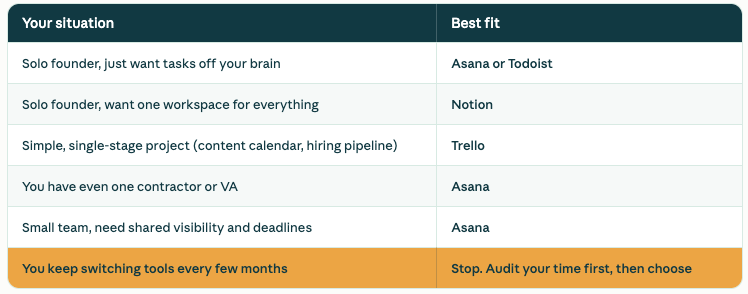
If you're already using one of these and it's not working, the tool usually isn't the actual problem.
Usually it's missing structure underneath it: no clear priorities, no SOPs, no consistent way of deciding what matters this week. A new tool won't fix that.
That's exactly what we solve inside Project Management Consultancy, building the structure and priorities first, then choosing (or fixing) the tool around it.
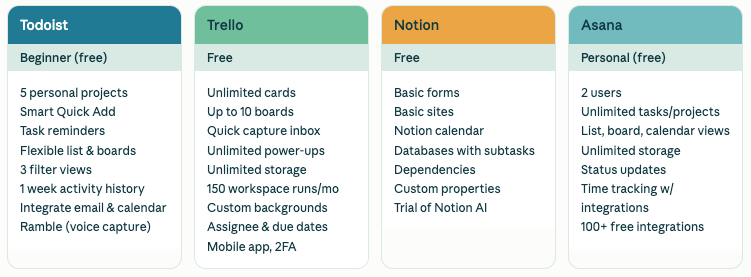
what you get on the free versions of each:
Can I Switch Tools Without Losing Everything?
Yes. Most tools allow CSV or direct import.
FAQ
Is Asana better than Notion for small businesses? Asana is better once you're coordinating tasks across more than one person. Notion is better if your priority is one connected workspace for notes, docs and tasks rather than team coordination.
Is Todoist good enough for running a business? Todoist works really well for solo founders managing their own workload.
Do I need a paid plan for these tools? All offer functional free plans. Todoist and Asana free tiers suit solo users well. Team features like timelines, dependencies and workload views typically require a paid plan.
What's the biggest mistake founders make when choosing a task management tool? Choosing based on features or aesthetics rather than actual team size and workflow. The result is an over-built system for a one-person operation, or an under-built one for a growing team.
Why doesn't Trello work for growing businesses? Trello's board format suits simple, single-stage projects well, but it lacks dependencies, deadline visibility and the structure needed once work involves several moving parts or multiple people.
How do Monday.com and ClickUp compare to Asana?
Both sit in the same category as Asana, built for team task and project coordination rather than solo use. I haven't used ClickUp enough to give you a proper steer. Monday.com I have tried, and the workload view didn't work for me, it felt clunky compared to Asana's. If you're already looking at Asana, it's worth trialling Monday.com or ClickUp alongside it before committing, since the differences tend to show up in day to day use rather than the feature list.